Table of Contents

NetSpeedTray is a lightweight, practical Windows utility that displays real-time network speed directly in the taskbar. It allows users to quickly and clearly view upload and download activity without needing to open Task Manager or any external dashboards. Whether you’re monitoring bandwidth usage, troubleshooting slow connections, or simply keeping track of network performance, NetSpeedTray offers a simple and effective solution.
At its core, NetSpeedTray works silently in the background, tracking network data transfer rates and updating the system tray icon with accurate speed metrics. This highly resource-efficient program is suitable for everyday use, even on older or less powerful systems. Its simple design doesn’t clutter your workspace, yet it provides essential information at a glance.
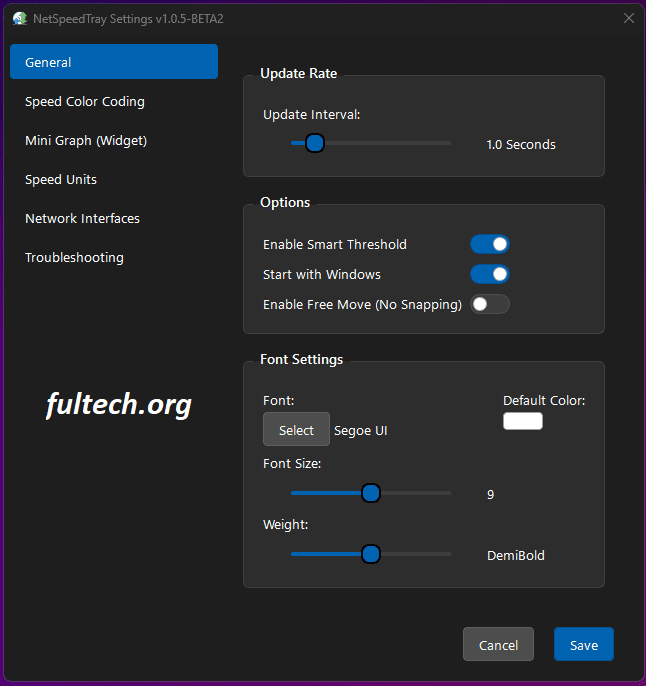
Users can customize update intervals, choose from various display styles, enable notifications, and switch between interface themes. This level of customization makes it easy to tailor the application to your workflow. Additionally, NetSpeedTray typically supports automatic startup, ensuring network statistics are ready as soon as the computer is turned on.
Key Features of NetSpeedTray
- Real-Time Network Speed in the Taskbar
- Displays upload and download speeds directly in the taskbar icon, allowing users to monitor bandwidth instantly.
- Lightweight and Low CPU Usage
- Runs silently in the background without consuming system resources.
- Customizable Display Options
- Choose from different icon styles, refresh intervals, and metric formats (KB/s, MB/s, etc.).
- Automatic Startup
- Starts automatically with Windows for continuous monitoring.
- Multi-Network Support
- Detects and tracks Wi-Fi, Ethernet, and mobile hotspot connections.
- Simple User Interface
- A sleek and simple user interface designed for quick navigation and easy configuration.
Advantages
- Lightweight and very fast
- Accurate real-time network speed readings
- Simple display screen
- Easy to configure
- Works with all major Windows versions
Disadvantages
- Limited advanced analytics
- No built-in historical tracking for long-term monitoring
- Basic interface design compared to full network dashboards
(Frequently Asked Questions) – NetSpeedTray
1. What is NetSpeedTray?
NetSpeedTray is a lightweight Windows utility that displays real-time upload and download speeds directly in the taskbar. It helps you monitor bandwidth usage instantly without needing to open additional applications.
2. Is NetSpeedTray free?
Most versions are free or offer a free basic version. Some versions may include optional premium features depending on the developer.
3. Does NetSpeedTray slow down my computer?
No. It is very resource-efficient and uses minimal CPU and RAM, making it suitable even for low-spec computers.
4. Can it track both Wi-Fi and Ethernet?
Yes. NetSpeedTray supports Wi-Fi, Ethernet, and mobile hotspot connections.
5. Does the utility display long-term speed history?
No. NetSpeedTray focuses on real-time monitoring only. It does not store historical bandwidth logs.
6. How accurate is the speed display?
It displays network speed based on live data transfers, making readings highly accurate and compatible with Task Manager.
7. Can I change the speed unit (KB/s, MB/s)?
Yes. The application allows you to switch between different speed units according to your preferences.
8. Does it start automatically with Windows?
Yes, you can enable the automatic startup option in the application settings.
9. Is the installation safe?
When downloaded from the official developer or trusted sources, NetSpeedTray is safe and free of malicious components.
10. How can I customize the system tray icon display?
Right-click the NetSpeedTray icon → Open Settings → Adjust icon style, refresh interval, colors, units, and more.
How to Install NetSpeedTray
- Download NetSpeedTray from the official website or a trusted source.
- Run the installer and follow the on-screen instructions.
- After installation, the program will automatically appear in your taskbar.
- Right-click the taskbar icon to access settings, speed units, themes, and customization options.
Final Thoughts
NetSpeedTray is a simple and highly practical tool for anyone who wants instant information about their network performance. With its immediate display, small size, and clear interface, it’s a valuable addition to everyday Windows use. While it doesn’t offer in-depth analysis or a detailed bandwidth log, its strength lies in its speed, simplicity, and ease of use. For users who prefer quick and simple monitoring without the need for heavy software, NetSpeedTray is an effective and reliable option.